 |
|
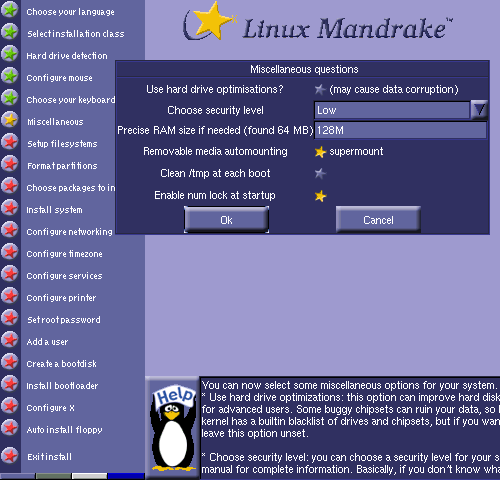
Several miscellaneous
settings can be made from
this window:
 Hard drive optimizations Hard drive optimizations
This can improve hard disk
access speeds but may not
work properly with certain
hard drives.
Security level
You can choose from
several preconfigured
security levels, "Medium" is
the recommended level.
Choosing the higher
security settings will reduce
the services available on a
machine.
Precise RAM size
If the amount of detected
RAM doesn't match what is
installed in your machine,
you can enter the correct
amount here.
Removable media
auto-mounting
This enables the
SuperMount utility which
provides automatic
mounting and unmounting
of removable media (floppy,
CD-ROM, zip, etc.).
Enable Num Lock at
startup
This turns on the keypad
number lock during the boot
process.
|